kitewing  ·  agentic data analysis  ·  typ kw 1

AI Data Analysis. Governed. Measured. Accurate.

typ kw 1 · 4 programme · agent streaming

Kitewing is an enterprise-grade data analysis agent. It comes with centrally governed, permissioned connectors to your data sources. It features staging environments, golden prompts and unit tests for accurate answers. It deploys into our cloud or yours.

mailing list
rows analyzed today
investigations filed

reply card — one letter when we ship something worth reading. no noise.

fig. — das lochband · governed, centrally managed connections to every system you run.

Kitewing connects to Athena, BigQuery, Databricks, DynamoDB, Firestore, PostgreSQL, Redshift, Snowflake, Airtable, Google Sheets, Datadog, Looker, PostHog, App Store Connect, Apple Ads, Customer.io, Meta Business, Metricool, QuickBooks Online, RevenueCat, Salesforce, GitHub, GitLab, Notion, Slack Bot.

standard equipment · governance

Don't hope for accuracy. Guarantee it.

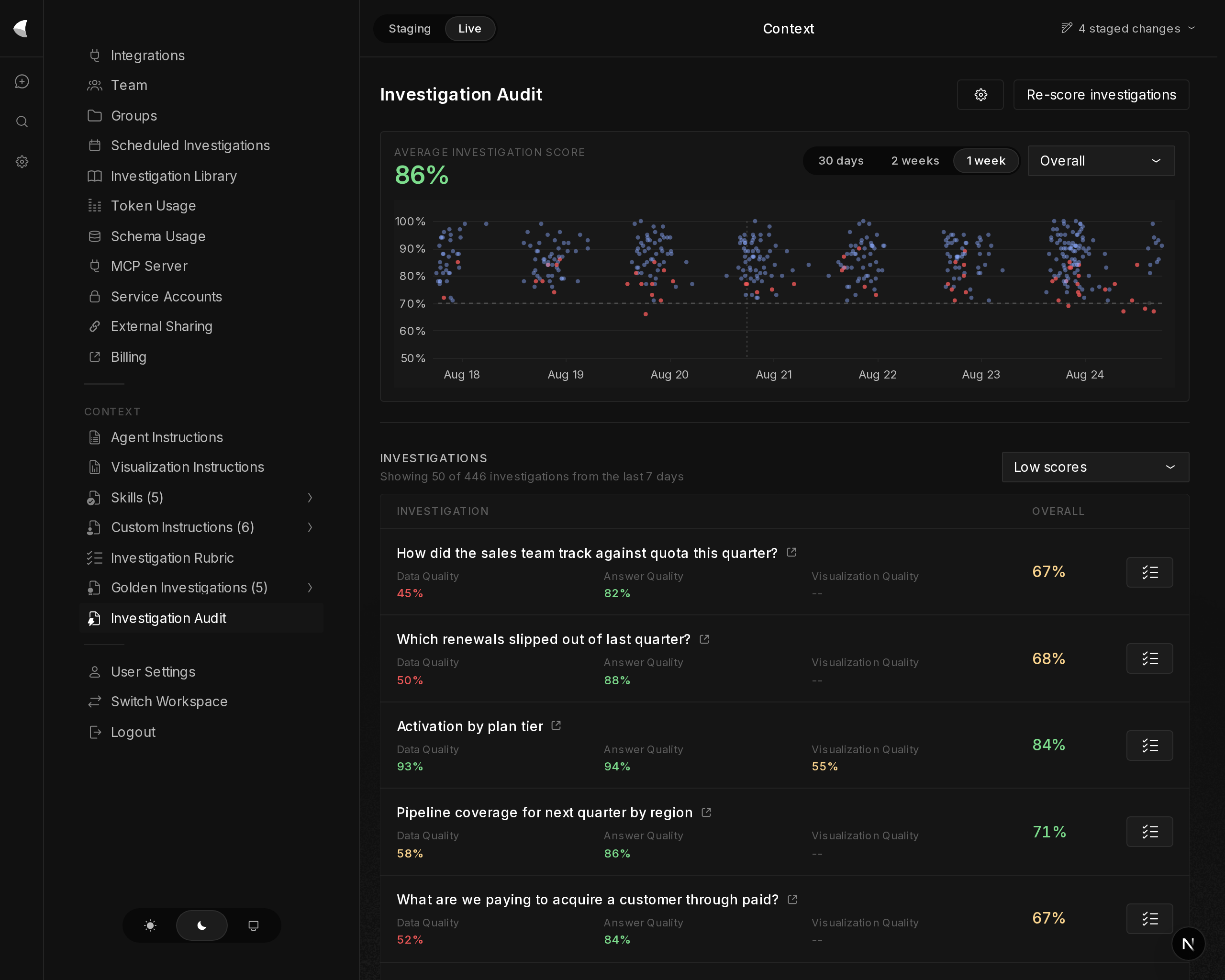
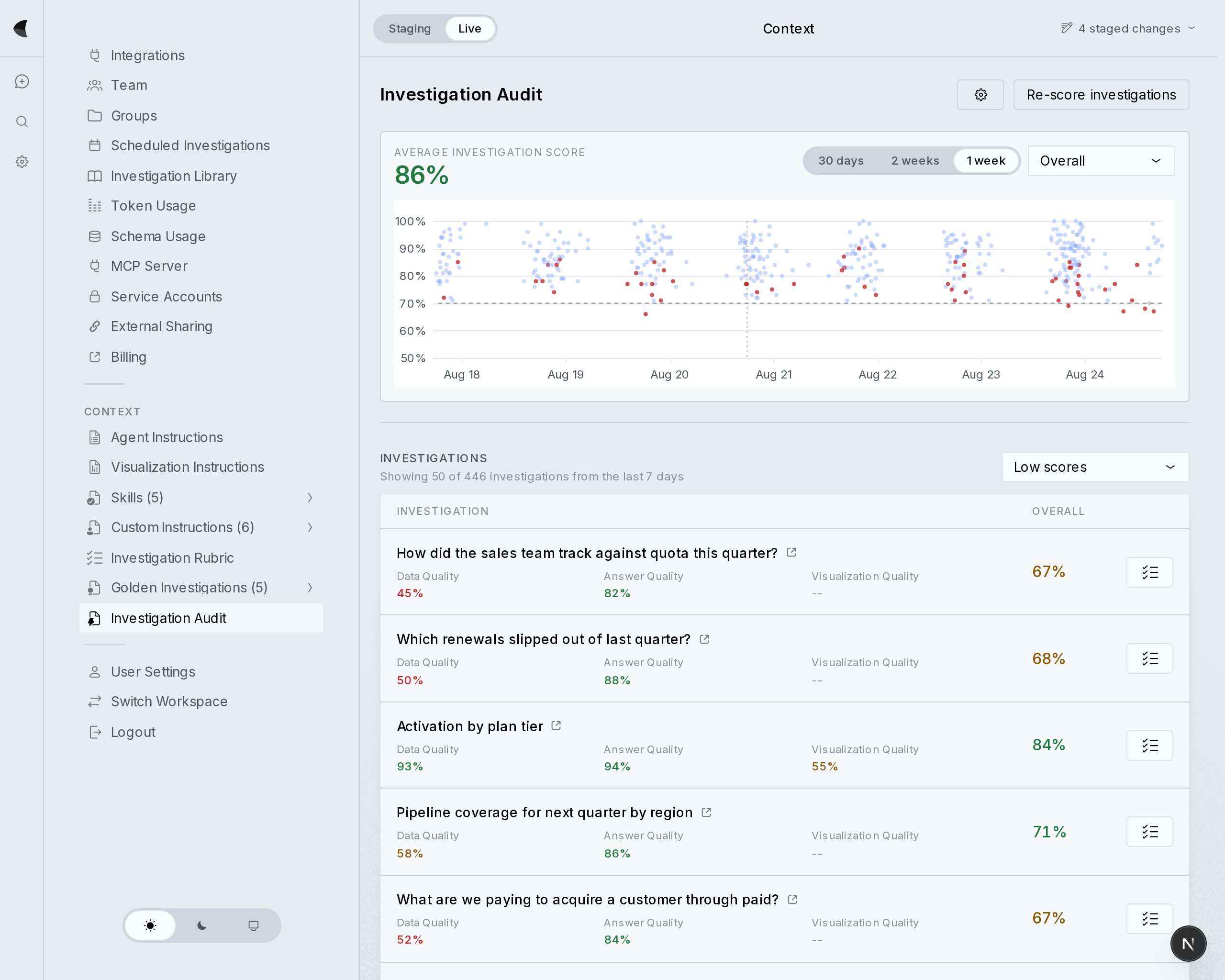
Kitewing's system is designed so you can measure accuracy, test it, and improve it. Deploy an answer bot to thousands of teammates with full confidence in the correctness of the system.

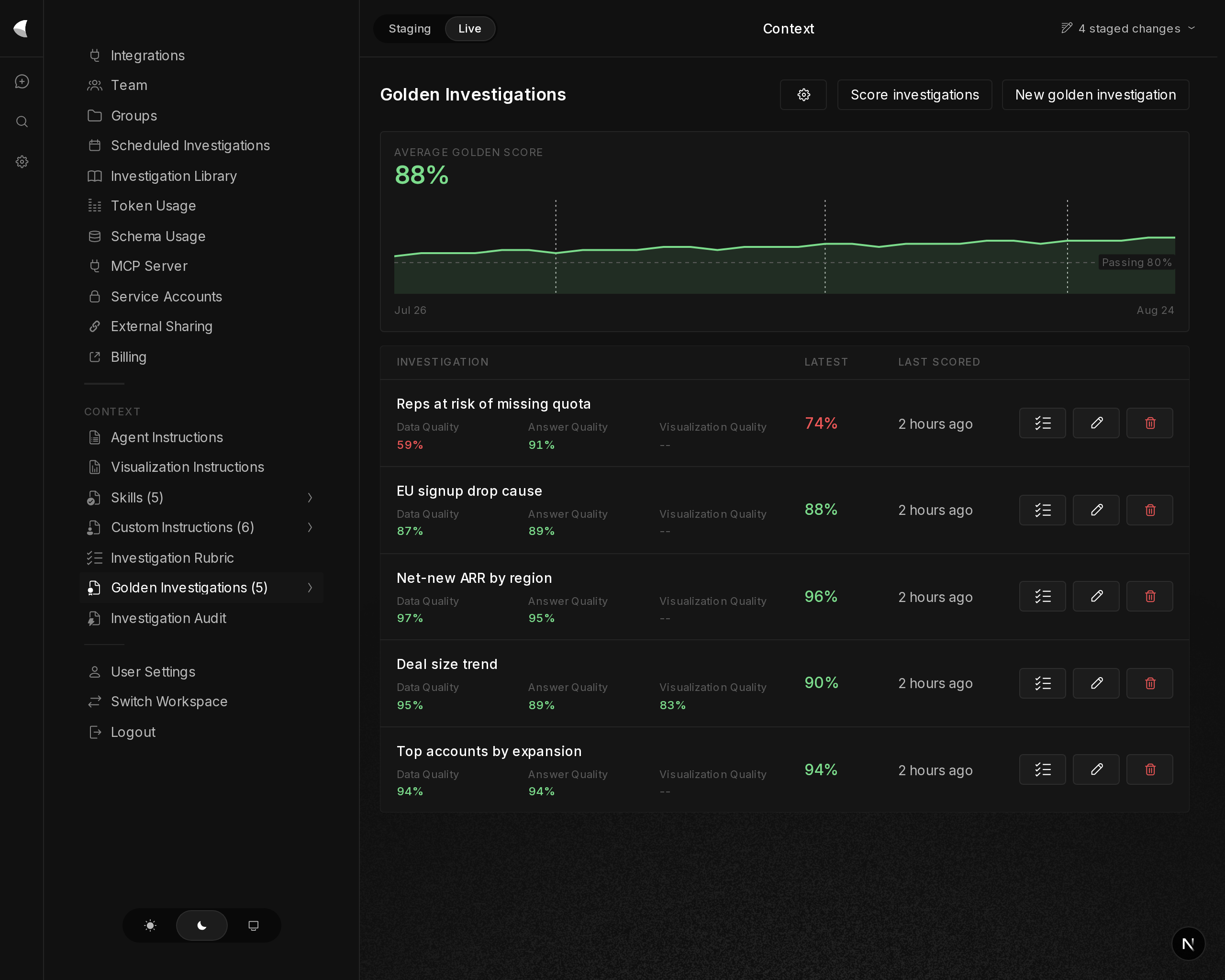
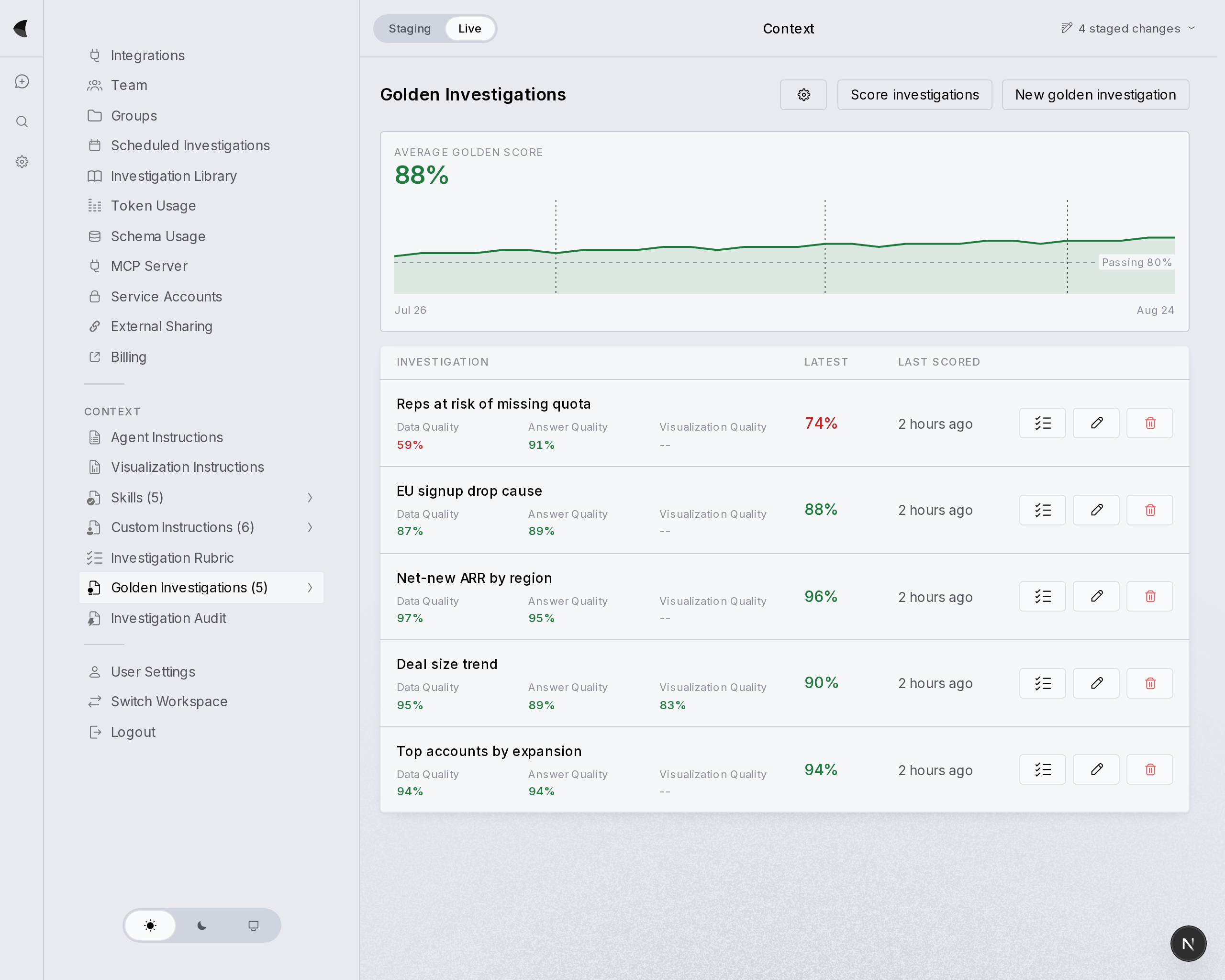
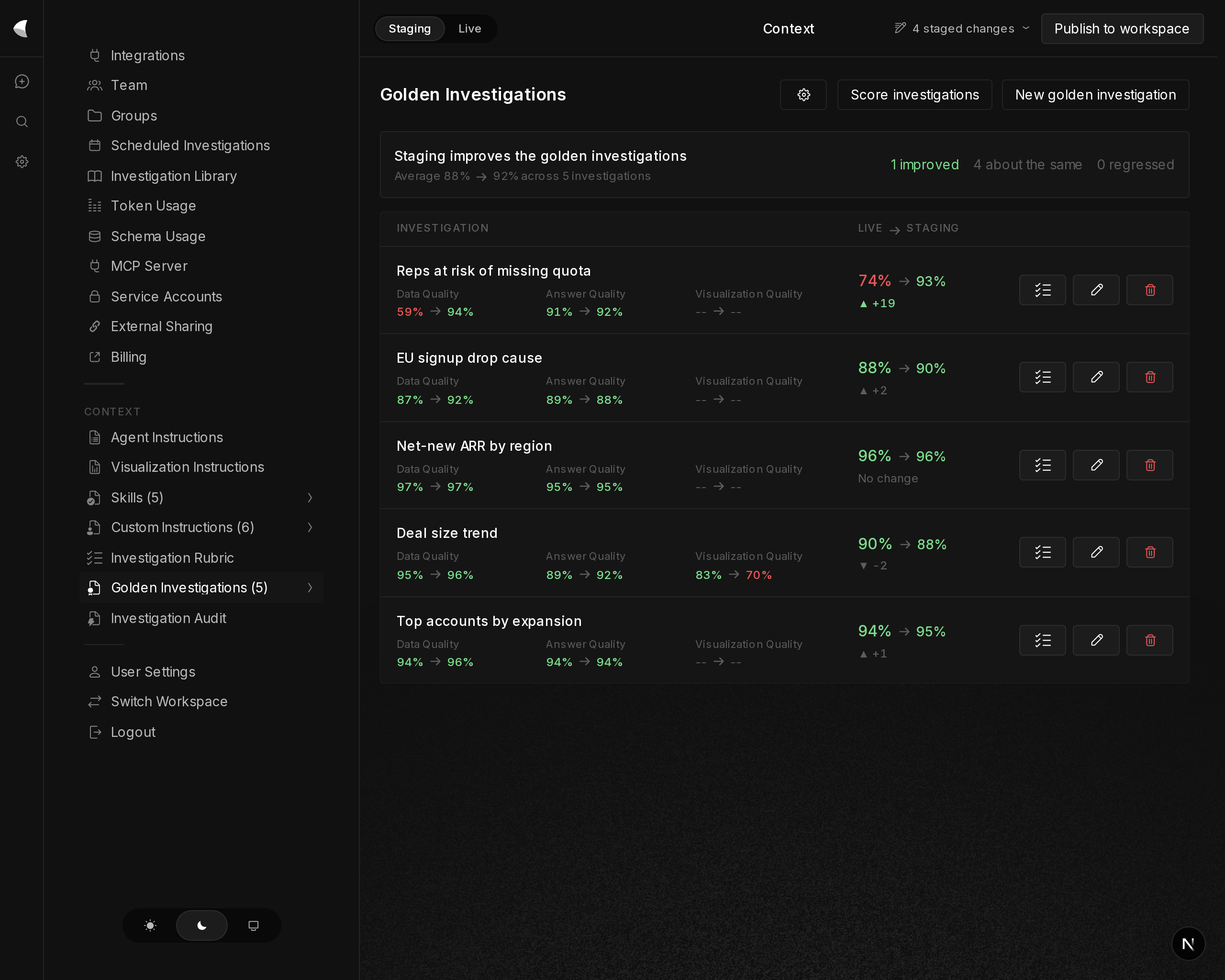
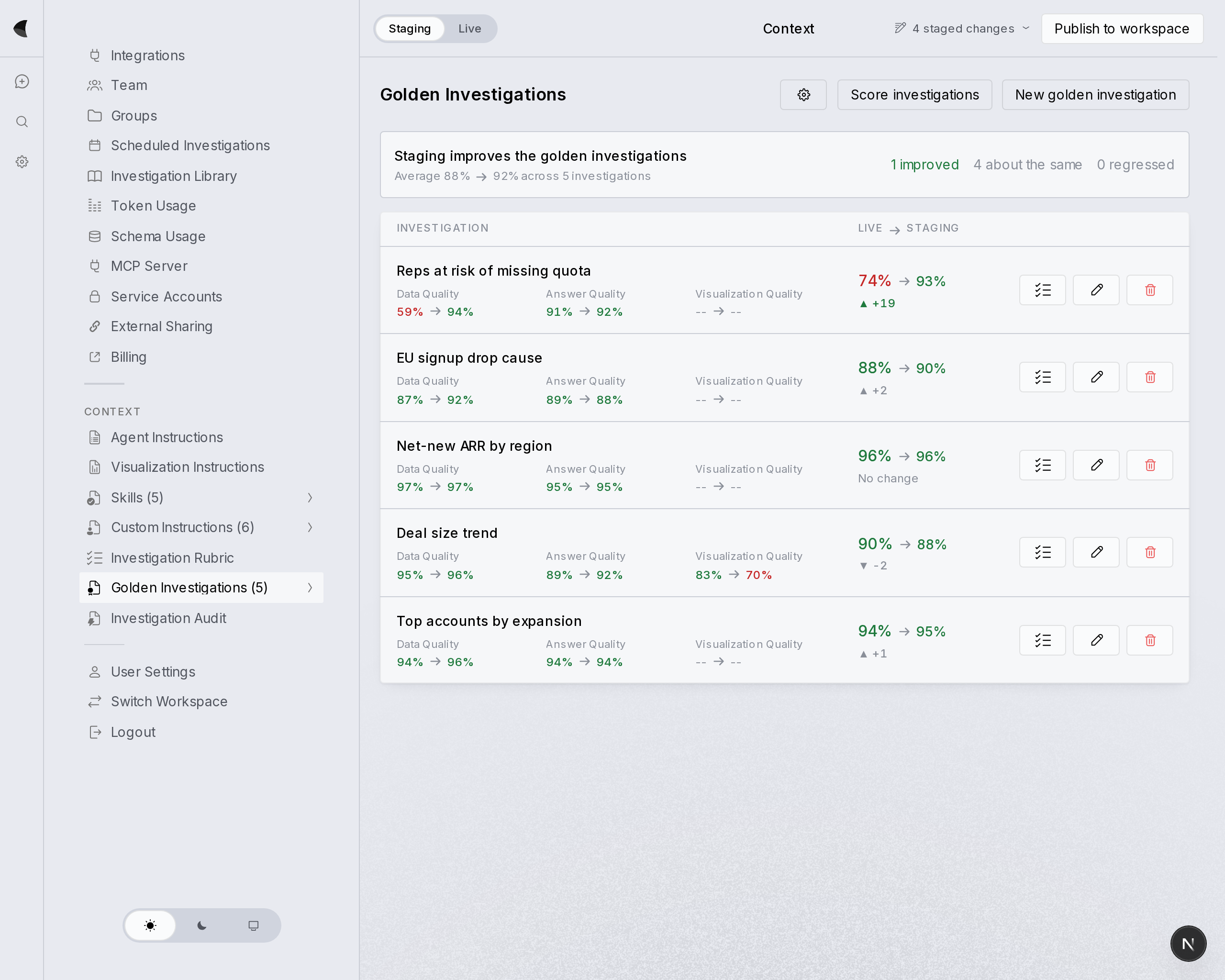
Golden investigations: approved question templates with quality scores tracked on every run
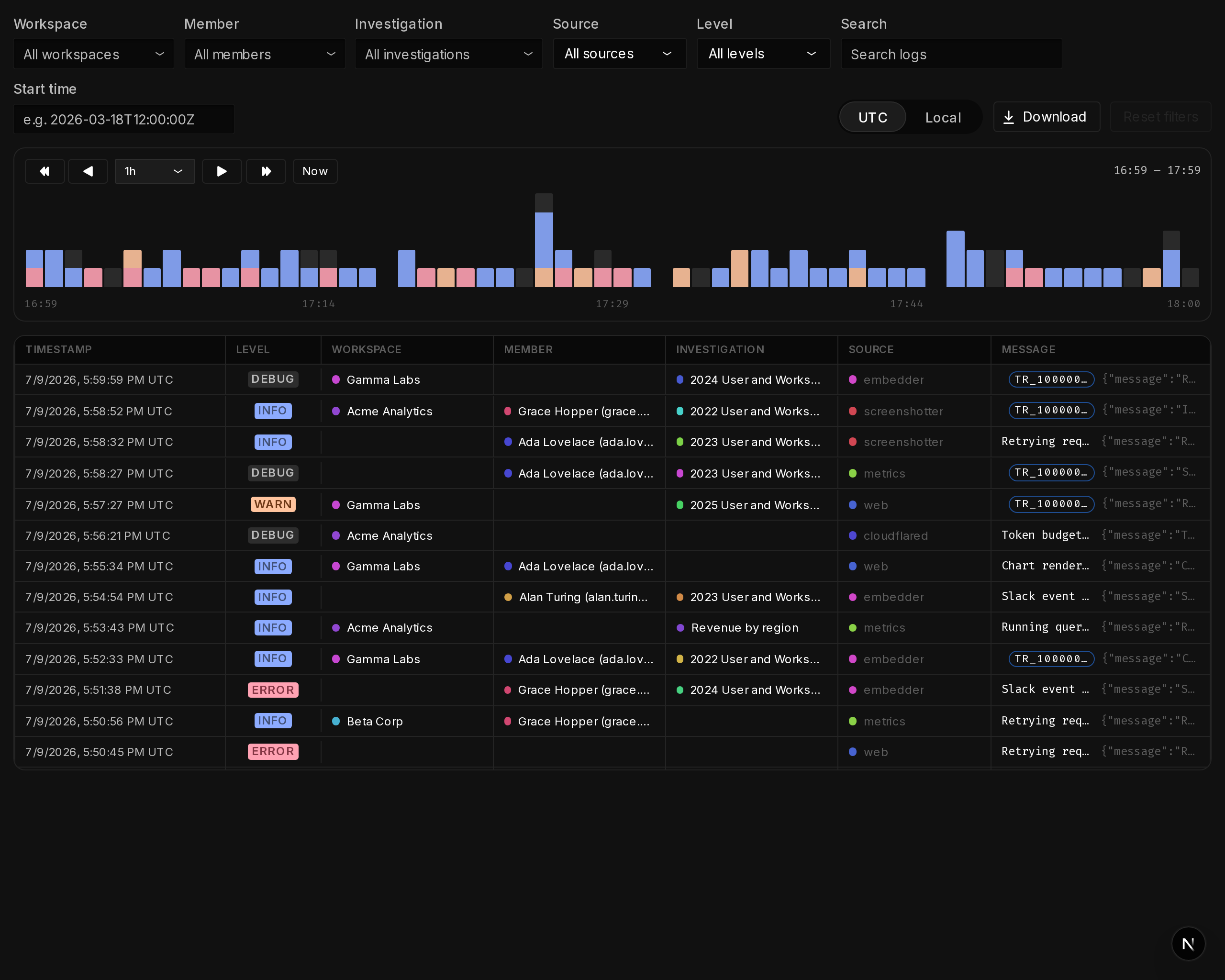
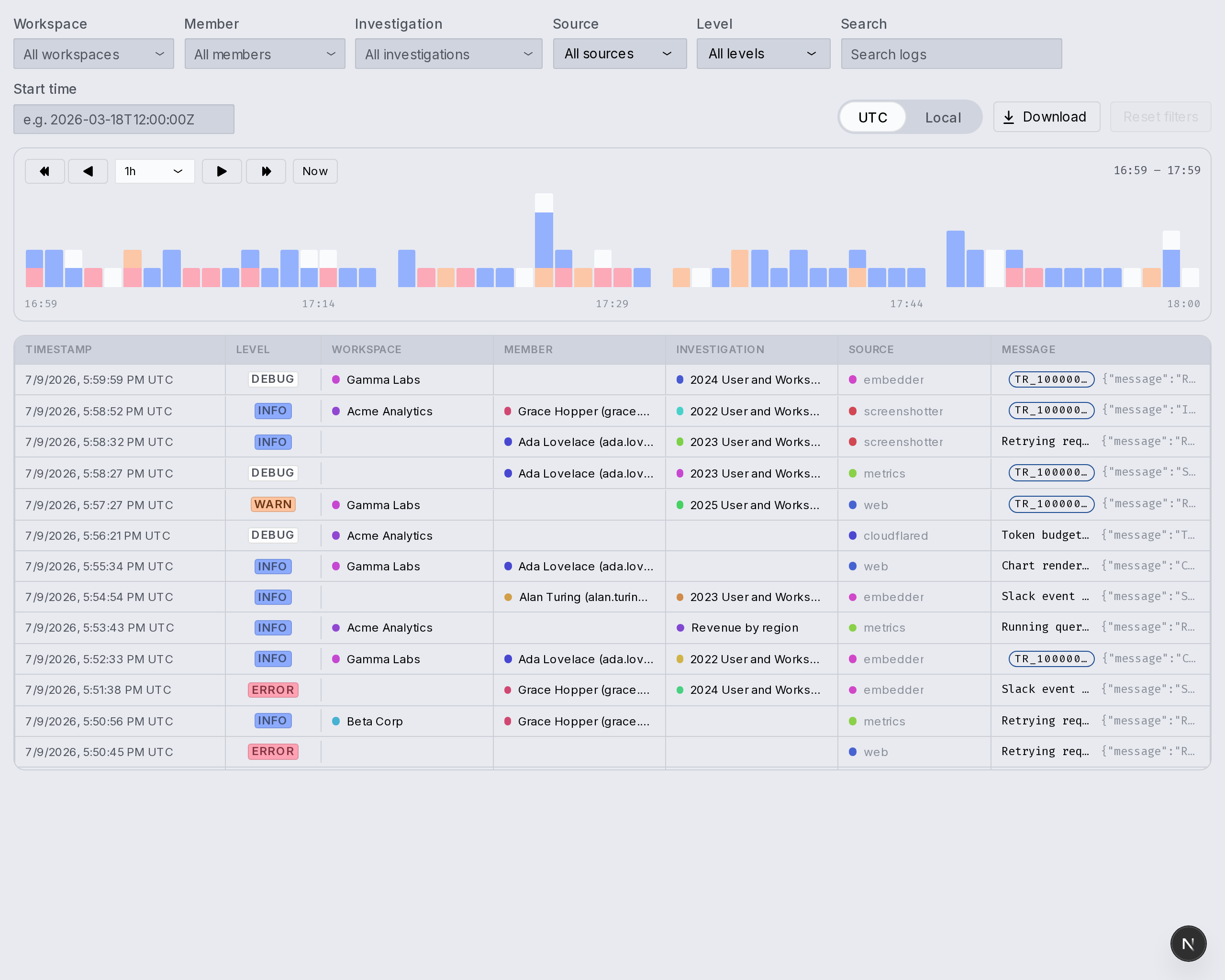
Audit logs: every query, source and operation on the record, filterable by workspace, member and investigation
Rubric grading: every investigation scored for data, answer and visualization quality before release
Staging: changes rehearsed against the golden investigations, scores compared live versus staging before publishing
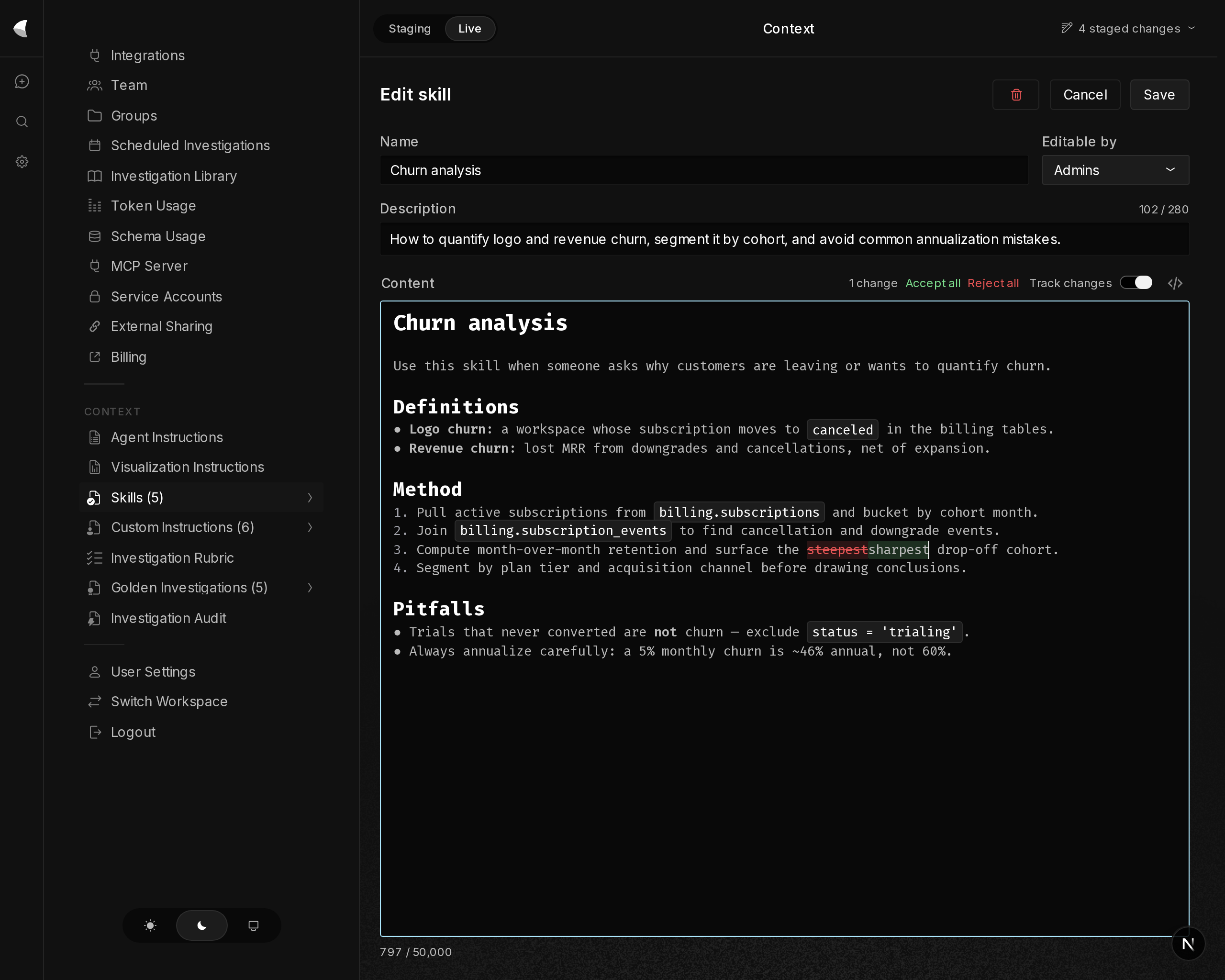
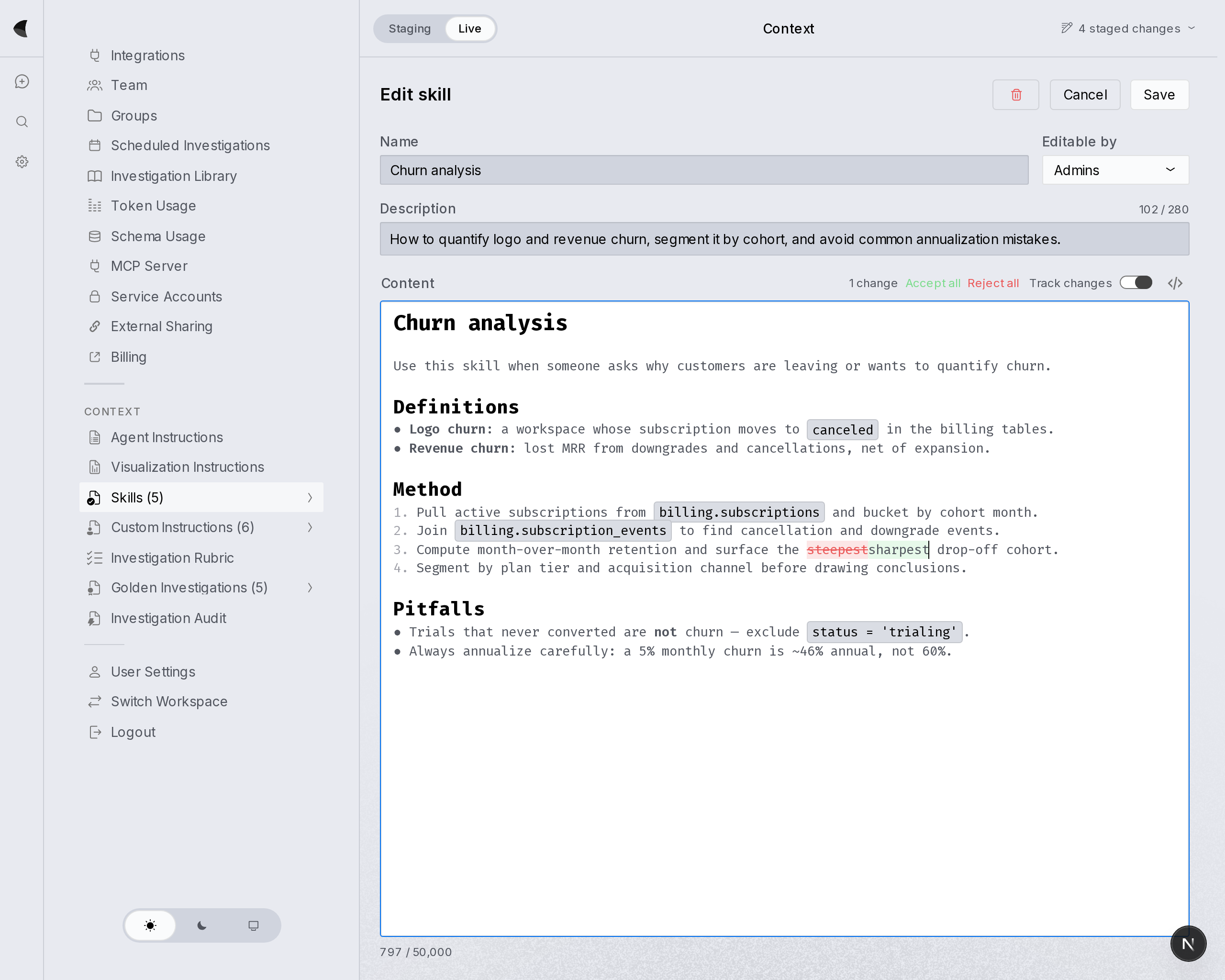
Role-based skills: reusable analysis playbooks the agent reads on demand, assigned per group with editing scoped to admins and every edit change-tracked for review
dunkelhell

flexible deployment

Our cloud or yours.

Run as many isolated instances in as many secure clouds as your business needs. Data in your cloud never leaves your cloud.

schematic · typ kw 1mode · saas / cloud / multiour cloudyour cloud · euyour cloud · ustyp kw 1 · kitewing environmentone environment. any cloud.
betriebsart
wk
entries
wk 33week of august 10, 2026
  • Scheduled investigationsCreate recurring questions in settings and Kitewing will answer them on a schedule, and deliver answers via Slack and email.
  • Investigation auditAdmins can now score investigations against a rubric from the new Audit and Rubric pages and measure quality and accuracy over time.
  • Apple Ads integrationConnect your Apple Ads account to query campaigns, ad groups, keywords, search terms and ad performance in investigations.
  • Queue follow-up messagesSend follow-ups while the agent is still working. They'll get automatically sent when the agent's turn is done.
  • The sidebar now groups investigations, reports and dashboards by "Today," "Yesterday," "This Week" and so on.
  • The Token Usage page now has a single "Top Costs" list covering investigations, reports and dashboards.
  • Result tables animate when expanding instead of jumping.
  • Consistent download icons across the app.
  • Better screen reader announcements for unread items in the nav.
  • Fixed quote-replying charts, tables and diagrams — it now works like it should.
  • Fixed handling of multi-line fields, e.g. public keys, in settings.
  • Fixed inline charts, regenerated charts and dashboard cells sometimes misplacing their data.
  • Fixed a failed Slack message derailing the rest of the Slack thread.
  • Fixed an edge case where a queued message could get dropped.
  • Fixed "Make report" and "Make dashboard" requests that could stall.
  • Fixed data tables losing their expand/collapse state after a while.
  • Fixed focus rings getting clipped at nav section boundaries.
wk 32week of august 3, 2026
  • Staged context changesAdmins can now draft edits to instructions and skills separately from the live copies; run investigations using the staged changes; and review all staged changes before pushing them live.
  • Investigations can read other investigationsVery handy for "start from the retention analysis we did last week and update it with…".
  • Added a pin toggle to the workspace nav so it can stay open.
  • The markdown diff viewer in change review now collapses unchanged sections into foldable "N unchanged lines" bands.
  • Many polish improvements to the instructions and skills editing screens.
  • The data lineage modal now fades out smoothly instead of vanishing, the context usage tooltip fits properly in its panel, and modal spacing and widths were tightened up.
  • The search overlay is now centered on the full viewport instead of offset by a few pixels.
  • Empty context pages (custom instructions, skills) now land on the list view instead of dropping you into the editor.
  • Replaced unicode arrows with proper icons so they theme and scale correctly.
  • Fixed investigation titles erroring while being generated.
  • Fixed hidden internal tool-use messages taking up a blank row in investigations.
  • Fixed stray blank lines and offsets at the top of SQL and Python code blocks, and fixed the copy button's position.
  • Improved error messages for various charting errors.
wk 31week of july 27, 2026
  • Opus 5Kitewing is now powered by Claude Opus 5, up from Opus 4.8. Also, when the model refuses a request outright, you now get a clear error message instead of a silent failure.
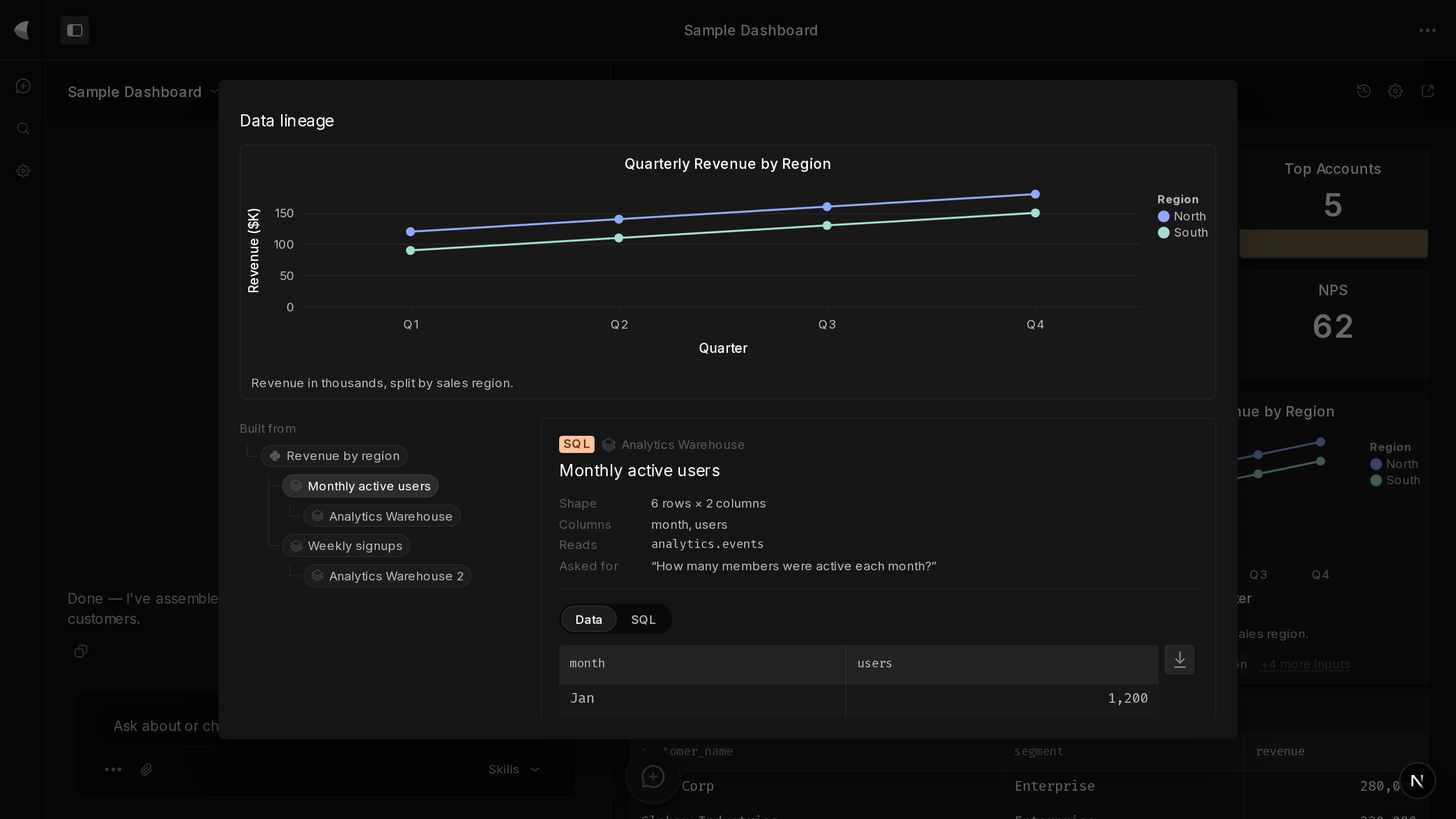
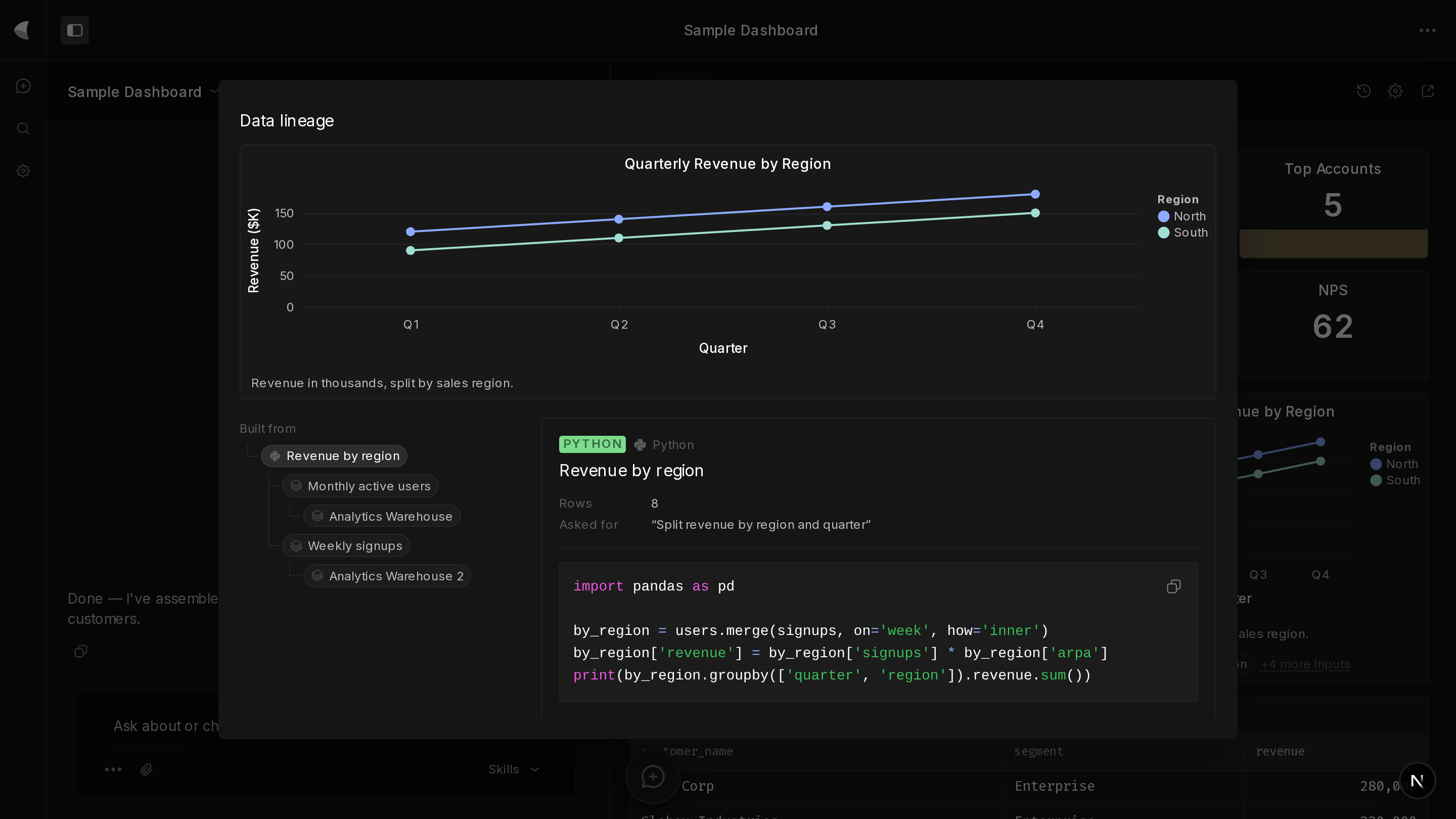
  • Data lineageCharts and tables now show the full chain of where the data came from, step by step.
  • Large investigations load 4× fasterBig investigation load time went from 1500 ms to 300 ms, and server processing from 300 ms to 150 ms.
  • Promptable chart sizesThe chart agent can now pick a size on purpose, including when you tell it what dimensions you want.
  • Skills, instructions and custom-instruction editors now have a track-changes mode.
  • When you ask Kitewing how to use a product feature, it now points you to the Kitewing team in Slack instead of guessing at an answer.
  • Integration cards, source chips and lineage details now show properly formatted document counts, e.g. "1,284 tables" or "100+ files."
  • Kitewing now warns when chart legend labels are going to get truncated.
  • Increased redundancy of Kitewing web servers to improve reliability.
  • Fixed generated diagrams leaking their own CSS and colliding element IDs into the rest of the page, and fixed the layout flash before the diagram loaded.
  • Fixed server-rendered charts falling back to a generic sans-serif font.
  • Fixed dragging to resize an inline chart drifting out of sync with your mouse. Oversized charts are now accepted rather than rejected, and saved chart heights render correctly on first load.
  • Fixed dropdowns and comboboxes with long option lists collapsing or showing nested scrollbars.
  • Fixed modals clipping the focus ring around the first item in the body.
  • Expired sessions now redirect you to login when refreshing a report or dashboard, instead of showing an access-denied screen.
  • Fixed switching investigations showing the wrong thread window or losing card state.
  • Fixed several App Store Connect data correctness issues that could produce double-counted or incomplete metrics.
  • Collapsed UI elements are now also invisible to screen readers.
  • Notion's "service overload" errors are now surfaced as a proper rate-limit error instead of an unhandled failure.
  • Fixed a bug where a single unreachable on-prem customer could cause Slackbot to be down for all customers.
wk 30week of july 20, 2026
  • QuickBooks integrationAdd your accounting data in QuickBooks Online to your investigations, dashboards and reports in Kitewing.
  • Group-based sharingAdmins can make user groups, and investigations, reports and dashboards can be shared with specific groups instead of just everyone or no one.
  • Private integrationsIntegrations can now be locked down to certain user groups. Their data are only accessible from investigations, reports and dashboards that are similarly locked down.
  • Private investigations from private channelsWhen talking to Kitewing from specific private channels, you can set the default permissions on the investigations that you launch.
  • The blue squares in the usage heatmaps now reflect token usage instead of raw activity, which wasn't really a measure of anything.
  • Fixed the Kitewing Slack bot not reading pasted data tables from Slack messages.
  • Unsquished the port field on database connection forms.
  • A bunch of small UI cleanup fixes in the settings pages.
wk 29week of july 13, 2026
  • Lockable skillsAdmins can now restrict certain skills so that only other admins can edit them.
  • Filter the sidebar by teammateQuickly collaborate with others, keep an eye on what others are investigating, and isolate service-account-created investigations if necessary.
  • Gave Kitewing a visual screenshot tool to view dashboards, improving the quality of dashboard edits.
  • Gave Kitewing a calculator tool instead of doing arithmetic in its head — now wired into the Notion, Git and research agents.
  • Redesigned the "Add Integration" picker into a searchable, grouped layout instead of a wall of buttons.
  • Custom instructions and skills now create and save instantly without a flicker — and without needing to save before assigning them to groups.
  • Efficiency improvements to investigation streaming, sidebar updates and chart generation.
  • Service account settings now show the OAuth token endpoint as its own clearly-labeled field.
  • Lots of nitpicky improvements to icons and UI components throughout the app.
  • Made the Team page load a lot faster.
  • Various security hardening improvements.
  • Fixed investigation error messages disappearing.
  • Fixed dropdown widths so long labels stop getting clipped.
  • Fixed external-share revoke causing a loading flicker.
  • Fixed the workspace nav sometimes not reopening after an overlay closed.
  • Fixed Investigation Library searches that used only filters (no text) returning no results.
  • Fixed author filter names showing up blank or oddly padded in search.
  • Fixed scroll position jumping when reopening an investigation that had an error.
  • Fixed certain kinds of reasoning patterns crashing investigations.
wk 28week of july 6, 2026
  • Groups and custom instructionsAdmins can now put users into groups, and assign custom agent instructions to different groups of users.
  • Revert to old versionsOld versions of reports and dashboards are available via the clock button.
  • Thinking modeKitewing will now sometimes spend extra time "thinking" as it embarks on investigations.
  • Service accountsAdmins can now make service accounts that get their own credentials, for background tasks and other robots that want to use Kitewing MCP.
  • Airtable integrationFor asking Kitewing to analyze data and information in your Airtable bases.
  • Metricool integrationSo you can analyze your social media campaign data from Metricool.
  • Let sub-agents read entire datasets pulled by other sub-agents rather than just previews.
  • Migrated Kitewing's Slackbot to Slack's new streaming Agent API.
  • When starting a new investigation, the input field now automatically gets focus.
  • Efficiency improvements to the Librarian sub-agent.
  • Smoothed out the beginning animation for new investigations.
  • Fixed Kitewing failing to edit reports after running into a bad data reference.
  • Fixed Kitewing's Slackbot giving up when running into the Slack message character limit.
  • Fixed the top-level nav staying open after you selected an option.
  • Fixed charts getting clipped in the MCP results carousel.
  • Fixed "new investigation" sometimes snapping back to the previous investigation.
  • Fixed some rare user auth failures.
wk 27week of june 29, 2026
  • Deterministic dashboard refreshesDashboards and reports now deterministically re-run SQL and Python, rather than relying on agents to rewrite them correctly. Refresh agents can also look up the previous investigations that built, modified and refreshed the dashboard.
  • Replaced "view mode" and "edit mode" on agent instruction files with a single view-and-edit experience.
  • Charts now render as SVGs so they look better when scaled up or down in the browser.
  • Expanded the information available to the reinforcement-learning "Librarian" agent.
  • Added "X days ago" to the dashboard/report's investigations list.
  • Raised max charts per agent response from 20 to 40.
  • Made Kitewing poll for updates faster — every 3 seconds instead of 15.
  • Cut Python startup time roughly in half with precompilation and by deferring the loading of scikit-learn.
  • Improvements to search ranking.
  • Improvements to CPU usage (i.e. lagginess) of dashboard refresh viewing.
  • Removed the title instructions feature, which no one was using.
  • Fixed certain types of bullet lists not being recognized by the markdown viewer.
  • Fixed ctrl-F sometimes not working after editing markdown in skills, agent instructions or reports.
  • Fixed tool use cards collapsing themselves when they weren't asked to.
  • Fixed a rare bug where you could start two investigations simultaneously.
  • Fixed data tables sometimes wrongly showing placeholder data instead of the real data.
  • Fixed unauthenticated API calls returning an HTML login redirect instead of an API error.
wk 26week of june 22, 2026
  • Apple App Store integrationFor all your search impressions, app store views and app downloads data.
  • UX cleanupMainly focused on Reports and Dashboards, but included quality-of-life improvements for the Skills editor, some bits and bobs in Settings, and more.
  • Kitewing now uses separate database credentials for the user-facing agent and for the metadata write-back feature, so the user-facing agent never holds write permissions it might be persuaded to use.
  • System prompt improvements resulting in parallel tool calls much more often, to speed things up.
  • Gave the agent a tool to make targeted edits to existing skills, hopefully resulting in fewer errors from ground-up rewrites.
  • Refreshed the look and feel of inline code in markdown blocks.
  • Updated the categories in the context usage pie chart now that Kitewing does more things, along with its look and feel.
  • Added a "pin first column" feature to data tables.
  • Added an "open fullscreen" option to dashboard charts and tables.
  • Smoothed out the rate at which characters stream, making the experience a bit slicker.
  • Improved error messages for Redshift and Postgres database integrations.
  • Allowed Kitewing to write longer replies — 32k tokens, up from 16k.
  • Fixed clicking a settings nav link that's a parent of the current page doing nothing.
  • Fixed file downloads not working when the filename contained non-ASCII characters.
  • Fixed Slack dashboard and report refresh notifications being smushed together into one long line.
wk 25week of june 15, 2026
  • Looker integrationLet Kitewing look up your Looker models and dashboards to confirm accurate calculations, or even query Looker models directly for semantically-validated data.
  • Mobile experienceKitewing is now usable on mobile browsers, with lots of improvements to the investigation, dashboard and report experience on phones.
  • Gave reports and dashboards a "delete" button.
  • Smarter code highlighting in agent messages and reports/dashboards.
  • Various improvements to the UI for data tables, especially moving download and pop-out buttons so they don't overlap the data itself.
  • Added a "Download data" button to charts in reports and dashboards.
  • Reports and tool results now stream in naturally, the same as agent messages, rather than waiting to be complete before displaying.
  • Investigation private/public status now inherits from the report or dashboard it belongs to.
  • Tuned the "learning from previous investigations" sub-agent to be faster and less comprehensive.
  • Excluded automatic-refresh investigations from the search corpus and related housekeeping.
  • Sped up chart generation by 15% in the median case.
  • Various visual improvements to our second most popular mode, light mode.
  • Fixed empty filtered results on the schema usage page causing all the filters to hide.
  • Fixed background report update emails not sending.
  • Fixed a bug counting total campaigns in the Customer.io integration.
  • Fixed dashboard tool usage not being included in token usage counts.
wk 24week of june 8, 2026
  • Introducing dashboardsDashboards are smart-updating, auto-notifying grids of charts and data tables. Ask Kitewing to make one for you, to edit one for you, or to notify you in Slack or email.
  • Google Sheets integrationAdd the Sheets integration from Settings and then share any sheets with Kitewing to make them available to the agent.
  • Slackbot streamingThe Slackbot now streams messages back just like the web app, rather than waiting until the full message is finished to send it.
  • Opus 4.8Kitewing upgraded from Opus 4.7 to 4.8.
  • Kitewing now shows a little spinner when it's working on a task like making a chart, report or dashboard.
  • Made some visual improvements to settings pages.
  • Fixed blank entries in the user filter in the Investigation Library.
  • Fixed agents claiming to be successful when their tool calls failed.
wk 23week of june 1, 2026
  • Introducing skillsSkills are agent instructions that are only used sometimes, e.g. a "Growth Analysis Skill" or "Fraud Detection Skill." Write skills in the Skills section of settings, or tell Kitewing to write one for you based on a recent analysis. Kitewing uses the right skills automatically, or you can force it to use your favorites in the new dropdown under the message box.
  • Report historyClick the clock button in the upper right to see the entire edit history of a report and travel back in time.
  • Meta Business integrationIf you run lots of ads on Facebook and Instagram, get your ROI and funnel data right in Kitewing.
  • Greatly lengthened the max length of a Slackbot reply, up to the Slack-enforced limit of 12k characters.
  • Simplified the search UI and greatly improved its performance.
  • Gave Kitewing a tool to make targeted edits to reports, improving its accuracy on small edits to long reports.
  • Reduced the amount of Main Character Energy in the Claude outage status banner.
  • Fixed Kitewing navigating you back to a previous investigation that just completed, against your wishes.
  • Fixed a rare token usage page crash.
wk 22week of may 25, 2026
  • Dramatically reduced the frequency of clarifying questions from Kitewing.
  • Added org-wide seat management tools for multi-workspace customers.
  • Gave the visualization agent the ability to visually validate its output in both light and dark mode.
  • Made radio buttons more visible in dark mode.
  • Made the client-side crash page look less jank, though we still hope you never see it.
  • Fixed a source of "token leaks" that weren't counted in the token usage dashboard.
  • Fixed the Slack bot aggressively truncating clarifying questions to a measly 500 characters.
  • Fixed overlapping axis labels and bar charts starting from non-zero baselines in the viz agent.
  • Charts that get stuck "generating" now correctly error out with a "retry" button instead of hanging forever.
  • Fixed re-prompting the viz agent not updating the prompt after sending it.
  • Fixed a timezone-dependent off-by-one-day error in the token usage chart.
  • Added a missing grant to the helpful text in the Databricks usage data export feature.
  • Fixed a cause of agent crashes, which would look like very slow responses or needing to retry your prompts.
  • More gracefully handled integrations being deleted in the middle of being refreshed.
  • Fixed the Salesforce integration so it correctly installs.
wk 21week of may 18, 2026
  • Share reports publiclyClick "Enabled" under "Share Publicly" on your report to share it to the wider world. Admins can disable this feature workspace-wide in settings.
  • Customer.io integrationConnect your Customer.io account from Integrations to have Kitewing get insights from your campaigns, broadcasts, newsletters, segments and customer activity.
  • Report refresh instructionsFrom report settings, tell Kitewing specifically what you want it to do every time it refreshes your report. E.g. "update the rolling date range in all queries," "ensure the conclusions are still accurate," or "leave me a fun easter egg somewhere in the report."
  • Slackbot glow-upThe Kitewing Slackbot now reads thread history for more context, can read file attachments in Slack messages, and only responds when asked — to avoid Kitewingsplaining in every single reply.
  • .xlsx file supportIf you were wondering whether MS Office is still undefeated: it is.
  • Lots of improvements to the Notion integration, so it can find pages mentioned and report back exactly what pages it read.
  • Rebuilt the usage export feature to include lots more information, including raw text of user prompts.
  • The sidebar now remembers which sections you collapsed and keeps them collapsed.
  • Report refresh now retries on failure.
  • Tightened up the layout of the "Data" tab in inline visualizations.
  • Several security improvements across the app, and performance improvements on the Integrations page in settings.
  • Fixed data table pop-out and download buttons colliding with table column headers.
  • Scheduled report refresh is now a completion-driven state machine: it defers if a refresh is already in flight, detects when one has finished before advancing the schedule, and bails out — with a 24-hour cooldown and a Slack notification — after three consecutive failures.
  • Fixed Kitewing forgetting custom chart sizes when refreshing them inside reports.
  • Fixed clearing and re-uploading the same file in the attachment input silently doing nothing.
  • Fixed some clarifying questions from Kitewing getting dropped on the way to Slack.
wk 19week of may 4, 2026
  • Promptable Slack and email notifications"Notify me if revenue drops by more than 2%." "Notify me if there's a traffic spike." "Notify me if the boss wouldn't like it." Find it in the refresh settings in reports.
  • Share reportsShare reports with the new "Share Report" button in the upper right. Makes a nice pretty report-viewing experience for the person you're sharing with.
  • Usage write-backUsage reports can be written back to your database. Databricks is the first supported DB for this feature — let us know if you need support for your favorite DB type.
  • Opus 4.7Kitewing is now powered by Claude Opus 4.7. We're smarter by 0.1 Claude versions.
  • You can now work with Kitewing reports over MCP, in addition to just investigations.
  • Kitewing can now look up past investigations in case you want to reference them from fresh investigations.
  • Improved Snowflake connection error messages.
  • Excluded Tom and Harry's usage from customer usage reports.
  • Slack previews now preserve the particular URL you shared instead of rewriting it to the canonical URL.
  • Fixed your own old investigations not showing up in "My Investigations" and "Starred Investigations."
  • Fixed the agent refreshing a report closing when it's done, even when you opened it on purpose.
  • Fixed chart re-prompting functionality not showing up in reports.
  • Fixed in-progress report edits showing up in the wrong report, in rare cases, when you're editing two reports.
  • Fixed overlapping Y-axis labels on token usage charts.
  • Fixed the Members page not undoing failed changes in the UI.
  • Fixed a rendering bug with filterable dropdown menus.
  • Fixed a category of bugs and errors that would crop up when network connections are spotty.
  • Removing a member from a workspace now correctly revokes their MCP credentials as well.
  • Got rid of the super annoying ≥, ≤ and ≠ characters that would automatically replace >=, <= and != in code blocks.
wk 18week of april 27, 2026
  • Report smart refreshesClick the refresh button to have an agent re-run all queries, check all results, fix all errors, and update any analysis. It also gives you a one-line progress report right there in the "Refreshing…" status bar.
  • Smart refresh schedulesWrite a sentence like "every other week on Tuesday at 5pm" and Kitewing will smart-refresh your report on that schedule.
  • RevenueCat integrationFor those of you with revenue and billing data in RevenueCat.
  • Improved the consistency and quality of the visualizations produced when manually re-prompting the visualization agent.
  • Fixed non-SQL data agents showing a "SQL" badge for a moment before switching to "JSON", "REST", "SOQL", etc.
  • Fixed new investigations not showing up in the sidebar until the first message arrived.
  • Fixed the "Save" button sometimes being improperly disabled in the report refresh schedule UI.
  • Various stability and security improvements this week.
wk 17week of april 20, 2026
  • Editable and re-editable reportsYou can now pop new chats to edit and re-edit reports as long as you like. The report lives on independent of the chat that created it.
  • Interactive charts and data tables in the report editorThe first of several upcoming improvements to reports functionality in Kitewing.
  • Larger file uploads and .docx supportThe year: 2026. MS Office: still undefeated.
  • MCP hosts can now look up investigations by URL, and have access to the visualizations themselves, to aid in multi-MCP-tool workflows.
  • Kitewing now displays a status banner when Anthropic is reporting a Claude outage.
  • Lots of performance improvements for reports, and especially visualizations in reports.
  • Simplified visualization URLs so that MCP host LLMs will have an easier time remembering them.
  • Lots of UI polish, especially the sidebar navigation, search experience and reports experience.
  • Fixed charts created from uploaded CSVs not showing the "Show Data" button.
  • Fixed being too chatty with MCP hosts and overrunning their context budgets.
  • Fixed stale charts flashing in and out when switching from reports to investigations and back.
  • Fixed the report pane not showing until the end of streaming.
  • Fixed overlapping buttons in the investigation header.
  • Fixed duplicate messages sometimes showing up in investigations.
  • Fixed a number of issues with MCP in VS Code.
wk 16week of april 13, 2026
  • Credit card billingAdded credit card billing for tokens, for those who prefer to get billed by us instead of Anthropic directly.
  • Interactive charts in the report builderCharts and data tables are now rendered interactively in the report builder, even in Edit mode.
  • Tidier integration settingsHid or minimized private-integration functionality and per-integration instructions to reduce user confusion.
  • Optional Investigation LibraryInvestigation Library functionality can now be toggled off.
  • Fixed an MCP auth bug that caused "Failed to Authorize" errors in some MCP hosts, including Claude Code.
  • Fixed CSV parsing for quoted fields containing embedded newlines.
  • Fixed a visual flicker when the page loads and you have a draft message saved.
  • Fixed a memory leak in long investigations with many Databricks queries.
  • Fixed the Kitewing icon in MCP connections.
wk 15week of april 6, 2026
  • MCP serverThe first version of the Kitewing MCP server is out. Admins can find the URL to add as a "Custom Connector" on the MCP Server page in settings. This is in active development, so send ideas and bug reports.
  • Opus 4.6Upgraded Kitewing to Opus 4.6 (from 4.5) across the board. We've been testing internally for a bit: it's neutral in many scenarios and better in some, with no notable degradations.
  • Improved number and currency formatting in data tables.
  • Made it possible for the message input box to get much larger.
  • Improved the Datadog integration by making it possible for other agents to access Datadog data.
  • Some UI performance optimizations.
  • We now correctly redirect you to the login page when your session expires.
  • Improved graceful shutdown on server restarts, to reduce what looked like random Kitewing hiccups.
  • Fixed forking an investigation not forking the file attachments.
  • Fixed markdown without a blank line before a visualization causing text to break containment and stop wrapping.
  • Fixed a timezone and date-boundary bug in the admin view of member activity.
  • Fixed the font size of code snippets inside headers.
  • Fixed a bug that occasionally caused broken visualizations.
wk 14week of march 30, 2026
  • Performance at scaleMany performance and stability improvements on large datasets. Thank you all for pushing us to scale Kitewing rapidly — more to come here as we work on Reports v2.
  • Personal access tokensKitewing now supports personal access tokens for auth with Snowflake and GitLab.
  • Improved the accuracy of the Git agent, including by letting it identify whether it's talking to GitHub or GitLab.
  • All agents and sub-agents can now read data created or modified by any other agent.
  • All charts and diagrams now have human-readable labels.
  • Made some improvements to investigation streaming to make it smoother.
  • Improved search performance.
  • Fixed a race condition that could cause errors when pages were refreshed or navigated at inopportune times.
  • Fixed tool results being accidentally omitted during streaming.
  • Fixed column ordering in file download filenames.
  • Fixed bytes being counted as characters when logging data size for Python execution requests.
  • Various isolation and security improvements for the Python runners and the agents service.
wk 13week of march 23, 2026
  • GitLab supportIf your dbt code, app code or context files are in GitLab, Kitewing can now connect, search, read and analyze them for you.
  • Resizable chartsGrab the bottom-right of a chart to resize it to taste. Double-click the bottom-right to reset its size.
  • Copy reports buttonCopy reports as rich text with charts, diagrams and data tables embedded. Pastes easily into Notion, Google Docs and other places.
  • Data-size scaling improvementsIncreased the size of result sets that Kitewing can reason about, and made many data-efficiency improvements for speed on large result sets. This work is ongoing.
  • Kitewing now endeavors to accept any text file within the size limitations, even ones with weird file extensions or browser-misclassified MIME types.
  • The Python agent now has its own breakout in the pie chart tooltip that displays context window information.
  • Got smarter about data previews for the master agent in the case of wide data rows and long individual data cells.
  • Fixed Slack previews not respecting custom chart dimensions.
  • Fixed text file attachments not preserving non-ASCII characters.
  • Introduced and then fixed a bug where charts didn't render due to Content Security Policy configuration issues.
  • Fixed complicated chart specs being incorrectly parsed, leading to wrong or erroring charts.
  • Fixed incorrect row counts shown in data previews when results were truncated.
  • Fixed the loading spinner incorrectly appearing for queries that completed with zero rows.
  • Fixed a confusing error message when attaching empty files.
  • Fixed a rare race condition that could lead to disappearing messages.
  • Improved our ability to diagnose and correct Python agent crash-restarts.
wk 12week of march 16, 2026
  • Python supportKitewing now writes and runs Python code in order to do statistical analysis and other data work that's a more natural fit for a true programming language.
  • Editable reportsClick the "Edit" button in reports to hand-edit them to your liking.
  • DynamoDB and Firestore integrationsIf you've got data in DynamoDB or Google Firestore, hook them up to Kitewing to investigate data from those sources.
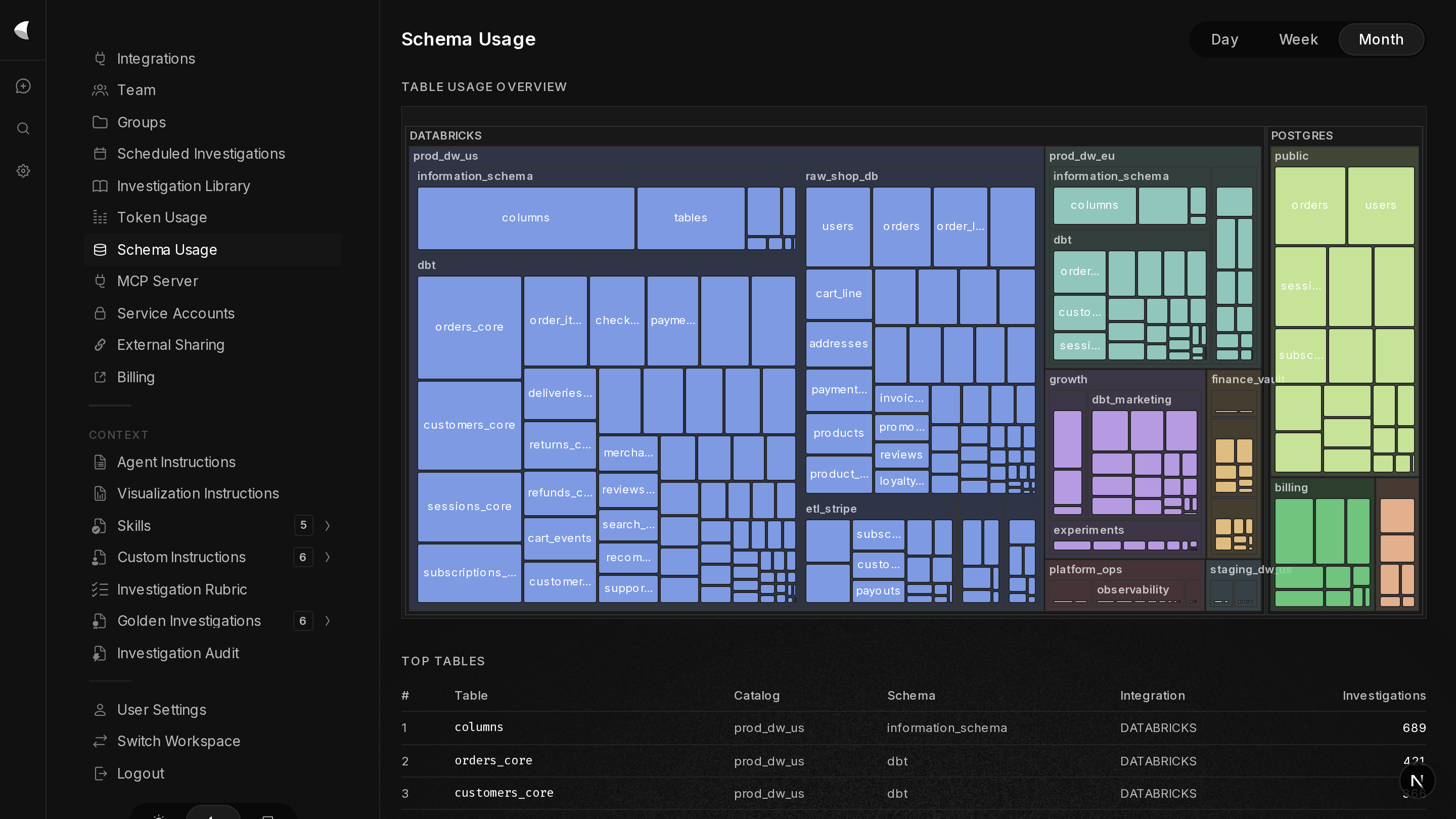
  • Schema usage dashboardAdmins can now see which databases, schemas and tables are being used most frequently, and can filter the Investigation Library by what data was accessed.
  • Data tablesKitewing can now show data as a simple, expandable, exportable table inline when that's the best option for presenting data.
  • Made the required permissions for data integrations more obvious in the connection UI.
  • Updated the Investigation Library filter UI to be more natural for larger numbers of filters.
  • Support for copying and downloading chart images.
  • Charts now have Kitewing watermarks. Marketing!
  • Data tables expand 100 rows at a time instead of all at once, helping you not crash your browser unless you really want to.
  • Agents no longer proactively create reports; they wait for you to click the "Make Report" button.
  • Fixed a few memory leaks, race conditions and stability issues exposed by very long conversations and very large agent-generated prompts. Also beefed up monitoring.
  • Fixed data-querying agents always showing a "SQL" badge even when the database language isn't SQL.
  • Fixed spacing when copying markdown tables to the clipboard.
  • Fixed long chart titles and chart rendering issues on narrow browsers.
  • Fixed a layout bug in markdown tables.
  • Fixed agent instructions saving without the saved instructions being apparent until a page refresh.
  • Fixed the markdown parser not recognizing list items with leading spaces.
  • Fixed deleting a visualization or data table in a report deleting one character of the underlying markup instead of the whole visualization.
  • Fixed the "Make Report" button disappearing after clicking "Make Report."
  • Fixed page title changes causing whole-page re-renders.
  • Told the agent not to tell users about data ref IDs, which are an internal implementation detail.
wk 11week of march 9, 2026
  • Introducing reportsKitewing now builds a stable report in the right pane alongside your investigation. You can take this report with you, share it, and soon it will auto-update and proactively notify you.
  • SOC 2 complianceKitewing completed its first SOC 2 Type 1 audit, and is currently in the observation window for SOC 2 Type 2. The auditor's report is available at our Trust Center.
  • PostHog integrationKitewing now integrates with PostHog so it can analyze all your web tracking and event tracking data.
  • Token usage dashboardAdmins can now view token usage data from the Token Usage page in Settings.
  • Inline data expansion: data cards and visualizations can show their data and SQL inline via the "Show Data" button.
  • Markdown syntax highlighting in agent instructions file editors.
  • Better organization in the "Add Integration" button now that there are lots of integrations to choose from.
  • The agent message box autofocuses when the agent replies, so you can just keep typing.
  • The data tab is now the default when you click "Show Data."
  • Support for legends in inline charts.
  • The master agent gained a tool to look up past SQL queries in case you ask about them.
  • Fixed a timezone conversion bug that could lead to weird invalid "sawtooth" charts.
  • Fixed faceted and multiview charts so they render correctly at different window sizes and don't "flash in."
  • Fixed horizontal scroll for wide tables.
  • Fixed several issues with search term highlighting.
  • Fixed a layout issue with SQL chat cards in "fat mode."
wk 10week of march 2, 2026
  • Admin token usage dashboardAdmins get a new page in Settings where they can monitor daily LLM token usage.
  • Custom title agent instructionsAdmins can give custom instructions to the agent that makes investigation titles — e.g. "ensure you keep customer names out of titles."
  • Salesforce integrationKitewing now connects to your Salesforce so you can investigate opportunity, account, lead and any other custom Salesforce data.
  • Datadog integrationKitewing now connects to Datadog so you can investigate logs, metrics, alerts and any other Datadog data.
  • If Investigation Library summarization fails, there's now a button to retry it.
  • Improvements to context management for past SQL queries, for both speed and accuracy.
  • Several improvements to the charting agent's results. This remains an active area of work.
  • Removed raw SQL from plaintext SQL agent summaries; it moved to the "Show SQL" section of the UI.
  • Library search now returns results from up to 400 investigations (up from 100), with a better UI when the limit is hit.
  • Increased the per-session tool error limit from 20 to 100, so long, complicated investigations have a lower chance of running into it.
  • SQL query timeout increased from 3 minutes to 10.
  • Improved context window management for uploaded CSV/TSV/JSON data files as well as text files.
  • Fixed the stop/cancel button getting stuck in a "stopping" state instead of aborting immediately.
  • Fixed a Databricks error where sleeping or cold-starting warehouses were treated as returning empty results instead of being retried.
  • Fixed long title and user-name overflow in the Investigation Library.
  • Fixed investigation search time filters using last-updated time instead of creation time.
  • Fixed token usage from cancelled investigations not being recorded.
  • Fixed schema indexing errors in Postgres, Redshift, Snowflake and Databricks silently recording 0 documents instead of surfacing the error.
wk 9week of february 23, 2026
  • Fork investigationsThe "fork" button below an agent message begins a new investigation starting from that point.
  • Reprompt visualizationsClick the pencil icon next to any chart to edit the prompt for any visualization and re-create it.
  • Context window meterThe pie chart below the message box shows how much context window is left. Hover for details.
  • Kitewing may now choose to make multiple visualizations from the same dataset.
  • If Kitewing thinks you asked for more than 20 visualizations in a single reply, it pauses and confirms before charging ahead.
  • Kitewing identifies common structural issues in uploaded CSVs and asks if you want to correct them before proceeding.
  • Cleaned up the bottom row of buttons under agent messages. Thanks for everyone's patience while we moved your favorite buttons around.
  • A clear error message when Kitewing runs out of context tokens, so we know what we need to fix.
  • Vastly improved formatting and download experience for inlined CSV data.
  • Several UX improvements to the investigation search experience.
  • Several improvements to context window management to enable longer, richer investigations and fix crashes.
  • Fixed CSV files exported from Excel with hidden byte-order-mark characters breaking chart generation.
  • Fixed a race condition that could cause multi-chart generation to fail when many charts were created at once.
  • Fixed investigations containing binary data (such as images) failing to progress.
  • Fixed empty Databricks results being mistakenly treated as errors.
  • Fixed the wrong chart showing up in Slack previews.
  • Disabled syntax highlighting on very long SQL queries so it no longer slows down the UX.
wk 8week of february 16, 2026
  • Learning from previous investigationsKitewing now learns from previous successful investigations. You'll see new blocks as it searches past investigations for approaches worth reusing — rate replies so Kitewing knows what to learn from. Admins manage the learning corpus from the Investigation Library page in Settings.
  • Quote-and-reply in investigationsSelect text in an investigation response and add it as quoted context to a follow-up message.
  • Navigation hotkeysA scroll-to-top button, plus ctrl/cmd-up and ctrl/cmd-down navigation hotkeys.
  • Team usage reportExportable team usage report for admins, available on the Team page.
  • Better context management for long investigations: improved truncation of old context, proactive retrieval of truncated context when it's needed again, and search tools that reference previously-returned results instead of duplicating them. Several "it just ran out of tokens" bugfixes, and new Anthropic-side caching features enabled.
  • Better investigation titles — the titling agent now has access to uploaded file names.
  • Much faster Markdown rendering, by deferring syntax highlighting and table rendering, and also by just making the dang thing faster.
  • Kitewing had its very first pentest this week; a couple of non-critical configuration issues it identified were fixed.
  • Fixed push notifications in Brave.
  • Updated bar chart agent instructions to reduce misleading log-scale charts.
  • Fixed typing long messages making the message box overlap the last agent messages.
  • Fixed Kitewing being very slow when used in concert with Grammarly.

— end of the roll · wk 8 —

fig. — der wochenschrieb · 25 weeks, 367 entries on the roll. The counters read whatever passes beneath the line.

kitewing designsystem · ausgabe 01 · 1972 / 2026

Style guide

An homage to the industrial design language of Braun, 1958–1978. Quiet surfaces, one working accent, instrument-grade information display. Every element earns its place; the accent marks the control that matters.

01

Farben / palette

paper#F4F2EDpage ground
panel#E7E4DCinstrument faces, cards
catalog blue#CFDDE2section grounds, rare
knob grey#8C8A84secondary text, rules
charcoal#1A1A1Aink, keys, dark panels
braun orange#F05A28primary action — one per view
signal red#D42B1Eindicators, logotype only
speed yellow#F2B705tertiary marks, warnings
lectron green#1E4A38kit mouldings, schematics

Rule: neutral surfaces everywhere. Exactly one orange element per view — the primary action. Red never competes with orange; it only indicates state.

02

Typografie / type

display · archivo 300 · 64/68 · -0.02em

Weniger, aber besser

headline · archivo 600 · 28/34

Analysis you can take apart

body · archivo 400 · 16/26

Kitewing shows its working. Every chart traces back to the exact operations that produced it — the transparent case on the flip clock, applied to statistics.

control label · archivo 500 · 11/14 · +0.14em · lowercase

ein   aus   phono   lw   mw   ukw

data · ibm plex mono 500 · 14/20 · tabular

1 284 309 rows · 0.42 s · p95 118 ms

Labels sit beneath the element they describe, never above. Headlines are sentence case. Nothing shouts; hierarchy comes from weight and space, not size alone.

03

Bedienelemente / controls

primary pushbutton — the order key, in the knob's orange
secondary pushbutton
orange knob — the one accent per view
grey knob — six detents, printed on the chassis
band keys — segmented control
slide switch — ein / aus, speed yellow per ps 500
detented slider — knurled slide in a channel
query field

Every control is mounted through the chassis: keys travel into their slots, the knob detents in its seat, the switch throws end to end. Scales and labels are silkscreened on the panel, never on the control. Hover states darken like matte plastic under a thumb; nothing glows but lamps.

04

Instrumente / data display

scale chart — revenue by region, q3, % of target
typoperationrowstime
kw 1ingest · postgres1 204 1180.31 s
kw 2join · orders ⋈ regions1 198 4020.08 s
kw 3aggregate · sum(rev)40.03 s
spec sheet table — the query plan, printed like a catalog

Charts descend from tuning scales: ruled ticks, a needle for the value, units always stated. Numbers are set in mono with thin spaces. On dark panels, ink inverts to paper.

05

Mechanik / motion

flip digits — values change by flipping, 120ms per digit
  1. Detent, don't drift. Movement snaps to positions. Easing is fast-out, hard-stop — cubic-bezier(0.2, 0, 0, 1), 120–200ms.
  2. Mechanism visible. Loading states are needles sweeping and digits flipping, never spinners or shimmer.
  3. One thing moves. A view animates a single instrument at a time. Everything else holds still.
06

Material / light & material

> lamp behind glassbright center · dark bezel
backlit readout — light indicates state, never paint
khz
recessed dial — paper bowed behind glass, needle rides above
moving-coil meter — domed glass, needle never spins
teak rail — wood belongs to the cabinet, never the face
moulded case — lectron green; the border wraps a brass screw

Physical cues are lighting, not decoration: light is emitted (backlight), reflected (glass, one catch light from the upper left), or absorbed (wood, paper tooth). One lamp per instrument; glass only over instruments; if you can name a texture at arm's length, it is too loud.

07

Geräte / devices

  1. The component is the device. Every page section is built as one instrument of the era: the hero is a television set, integrations are a punched tape in a reader, governance is an electronics kit, deployment is a backlit mimic panel. Nothing on the page is decoration; everything is chassis, control, or printed matter.
  2. The product is the picture, never the case. Screens and exhibits show Kitewing in its own idiom — Inter, near-black ground, soft cards. The 1968 cabinet frames the 2026 product; the contrast is the point.
  3. Copy is printed on the equipment. The headline is set on the dial paper like station names; descriptions are catalog entries and figure captions (fig.); feature words are silkscreened onto kit blocks. No text floats beside the device it belongs to.
  4. Instruments tell the truth. The needle advances because the stream advances; a block seats when pressed; a red mark appears only to indicate state. No motion without a mechanism behind it.
  5. One hidden function per set. Each device carries one quiet extra — beleuchtung on the television's rail and hell/dunkel on the kit case flip the product between its real dark and light themes; poking the mimic panel's glass makes its lamps restrike (zündung); the tape's reader head runs it backwards for a beat (rücklauf). A reward for the curious, never a requirement.